PeerGuardian 2, is an awesome IP filtering software. Though its FOSS, it there isn’t a Linux port of it yet. But don’t worry, if you’re using KTorrent, you can make use of PeerGuardian’s filters. Let me show how you can do so.
Launch KTorrent. Click on On Settings -> Configure KTorrent . Click on Plugins and ensure that IP FIlter is checked

Now Click on Apply. Next on the sidebar, scroll down and click on IP Filter. Click on the checkbox next to “Use PeerGuardian Filter”. Next just click on Download/Convert. It might take a minute or two for the list to be loaded and converted to a format KTorrent can understand.
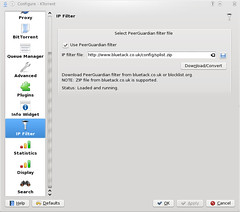
Next Click on Apply and OK. There you go, you’re done. KTorrent now will make use of PeerGuardian’s filters.
