Dolphin’s fast loading times and clean interface made me consider to have a second look at Dolphin. So here’s a way to make Dolphin the default file manager.
If you haven’t installed Dolphin yet, install it via apt-get or Adept. More info about that in my previous post.
Then, Click on K Menu -> Run Command and type ‘kcontrol’ (without the quotes, of course).
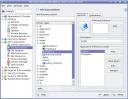
Then Click on KDE Components -> File Associations. Expand the inode section.
![]()
Make Dolphin the first choice, by moving it above Konqueror in the precedence order. This will ensure that Dolphin gets the first priority for opening directories.
To make dolphin the default file manager for the virtual directories kde creates e.g. system:/ then again in the File Associations section of the control centre expand the inode section of Known Types. Under the system_directory mime type, add dolphin to the list of applications(If Dolphin entry is already present, remove it), however instead of choosing dolphin from the kmenu, type the following in to the text box at the top dolphin %u The virtual directories created by kde will then be opened by dolphin as default
Voila! Dolphin is now your default file manager!

So you gots a tech blog…heheh
Awesome stuff dude…I’ll bookmark this – trust me
Thanks. I was wondering where these settings were. I wish they would better-organize the various system control software in KDE so us newbies would see KControl in an obvious place.
hiya buddy!
just did that. Tankooooo :)
Why would anyone replace Konqueror with Dolphin as the default file manager? That’s like replacing a Porche with a yugo. Dolphin lacks many of the features Konqueror has. If it doesn’t have a tabbed UI, it isn’t a worthwhile file manager. Dolphin is just a dumbed-down version of Nautilus anyway.
if you like software for idiots, you might wanna switch to gnome.
Thanks for the post. I used it in Gutsy to go back to Konqueror, as Dolphin annoys me :)
When I did the upgrade from 7.0x -> 7.1, I had Dolphin shoved down my throat, when I was perfectly fine with Konqueror. Thanks for the tip on how to change it _back_. Why the upgrade didn’t respect my previous choice baffles me…
I don’t like konqueror’s long startup time, so I’d like to use dolphin…
except it doesn’t open the system:/ directories even with the %u option applied.
@sil Have you added Dolphin for system_directory mime type? It seems to work for me
>> Have you added Dolphin for system_directory mime type? >> It seems to work for me
Yes, I added it for system_directory.
I use ‘dolphin %u’. It opens “/home/sil/” but not system:/home, media, etc.
I’m using SuSe 10.3.
@Sil I’ll look into it and get back at you.
Could anyone tell me how set up konqueror as default file manager in opensuse 11? I tried your way, but it gives no result
Menu > Configure Desktop > Advanced > File Associations > inode> directory. Move Dolphin down > Apply.
If you wanna change behaviour of embebbed apps, goto Embedded tab i meke nessessary changes > Apply.
Done and enjoy!
ehh. thanks
In recent versions of KDE 4 (4.3 onwards) it is easier to switch the default file browser by going to System Settings (KControl) -> Personal -> Default applications -> File manager and selecting your favorite there.
Thanks for the tip. This post was composed quite some time ago :)
I understand that but where does it take us?
Hallo echt super Website.
Den weissen Hintergrund würde ich mit einem dezenten leichten Gelbton anpassen ist angenehmer für die Augen.